
What is semantic coding and why do we need it?
Long time ago (about fifteen years ago) almost everybody was making web sites and didn’t care what was under the hood. We designed them with tables and we used all kinds of stuff (div and span in particular) and didn’t care too much about accessibility. And then HTML5 came along, and lo and behold, we were hooked.
Semantic markup – an approach to markup that is based not on the content of the site, but on the semantic purpose of each block and the logical structure of the document. Even in this article has different levels of headings – it helps the reader to build the structure of the document in his head. It’s the same on a website page – only the readers will be a little different.
Why semantics are important
To make the site accessible.
Sighted users can easily figure out at a glance where which part of the page is located – where the header, lists or images are. For the blind or partially sighted, it’s more complicated. The main tool for browsing websites is not the browser, which draws the page, but the screen reader, which reads the text from the page out loud.
This tool “reads” the content of the page, and the semantic structure helps it better determine which block it is now, and the user understands what it’s about. In this way, semantic markup helps more users interact with your site. For example, having headers helps the blind navigate the page. Screen readers have a headline navigation feature, which speeds up familiarity with the information on the site.
To get the site higher in the search engines.
Search engine companies don’t divulge ranking rules, but it is known that having semantic page markup helps search bots better understand what’s on the page and rank sites in search results based on that.
A classic example is the Sapsan train schedule on Google.
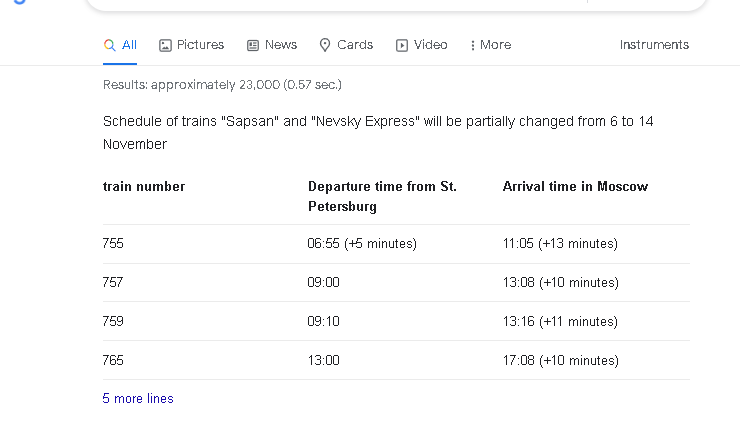
The developers of tutu.ru have made a table with the tag table instead of div, and their snippet ended up in the Google search for an important commercial query.
Semantics is prescribed in the standards. Many developers in the old fashioned way use constructs like <div id=”nav”> to denote navigation or other structural elements of the page. Meanwhile, there are several semantic tags in the HTML standard that are recommended for page markup instead of <div> и span. The specification describes the role of each semantic element.
Imagine how much easier it is to read <nav></nav> Instead of <div class="nav"></div>. Or this code. See it and you’ll immediately understand what’s here and why.
<!DOCTYPE html>
<html lang="ru">
  <head>
    <meta charset="utf-8">
    <title>Page Title</title>
  </head>
  <body>
    <header class="main-header">
      <!— Site cap —>
    </header>
    <main>
      <!— Main content of the page —>
    </main>
    <footer class="main-footer">
      <!— Site basement —>
    </footer>
  </body>
</html>
Basic HTML semantic tags
Some of the “old” tags from earlier versions of HTML are also semantic, like the
tag, which stands for paragraph. The tags <i> or <b> not semantic, because they do not add meaning to the highlighted text, but simply define its appearance.
But the current version of the HTML Living Standard has semantic tags for almost all major parts of the site, and it is better to use them. Here are some examples of semantic tags.
<article>
- Meaning: an independent, separable semantic unit, such as a comment, tweet, article, VK widget, and so on.
- Special features: a header inside is desirable.
- Typical errors: confused with tags
<section>и<div>.
<section>
- Meaning: the semantic section of a document. Indivisible, as distinguished from <article>.
- Special features: a header inside is desirable.
- Typical errors: confused with tags
<article>и<div>.
<aside>
- Meaning: incidental, indirect to the page content.
- Features: Can have its own header. Can occur several times on a page.
- Typical errors: count
<aside>tag for the “sidebar” and mark with that tag the main content that is associated with the elements around it.
<nav>
- Value: navigation section with links to other pages or other parts of pages.
- Features: is used for the main navigation, not for all groups of links. The main navigation or not – at the discretion of the codifier. For example, the menu in the basement of the site may not be wrapped in
<nav>. In the basement usually appears a short list of links (e.g., link to the main, copyright and terms and conditions) – this is not the main navigation, semantically for such information is intended. In the basement usually appears a short list of links (e.g., link to the main, copyright and terms and conditions) – this is not the main navigation, semantically for such information is intended<footer>himself. - Typical mistakes: many people think that in
<nav>can only be a list of navigation links, but according to the specification there can be navigation in any form.
<header>
- Value: introductory part of a meaningful section or the entire site, usually contains cues and navigation. Most often repeated on all pages of the site.
- Features: There can be several of these elements on a page.
- Typical errors: use only as a website header.
<main>
- Value: the main, not repeated on other pages, content of the page.
- Features: should be one on the page, based on the definition.
- Typical errors: include in this tag what is repeated on other pages (navigation, copyrights, and so on).
<footer>
- Meaning: the final part of a meaningful section or the entire site, usually contains information about the authors, a list of references, copyright, and so on. Most often repeated on all pages of the site.
- Features: there may be several of these elements on the page. Tag <footer> is not required to be at the end of the section.
- Typical errors: use only as a basement of the site.
How to mark up a page in terms of semantics
The marking process can be divided into several steps with varying degrees of detail.
- Large meaningful blocks on every page of the site. Tags:
<header>, <main>, <footer>. - Large semantic sections in blocks. Tags:
<nav>, <section>, <article>, <aside>. - The title of the whole document and the headings of the meaningful sections. Tags:
<h1>-<h6>. - Small elements in meaningful sections. Lists, tables, demos, paragraphs and hyphenation, forms, quotes, contact information, and progress.
- Phrase elements. Images, links, buttons, videos, time and small text elements.
I’m not sure what tags to use
There are simple rules for choosing the right tags.
Found the most appropriate meaningful tag – use it.
- For streaming containers —
<div>. - For small phrase elements (word or phrase) —
<span>. - The rule for determining
<article>, <section>и<div>:
- Can you name the section and move it to another site? —
<article> - Can you name a section, but you can’t put it on another site?—
<section> - Can’t give you a name? Is it something like “news and photo gallery” or “right column”? —
<div>
Exactly what not to do
Don’t use semantic tags for embellishments. That’s what CSS is for.
It may seem that some tags are appropriate to make the page prettier, to move the text around, or to add spacing to it. But just because the browser defaults to displaying tags the way you want them doesn’t mean you have to use them. Let’s look at an example.
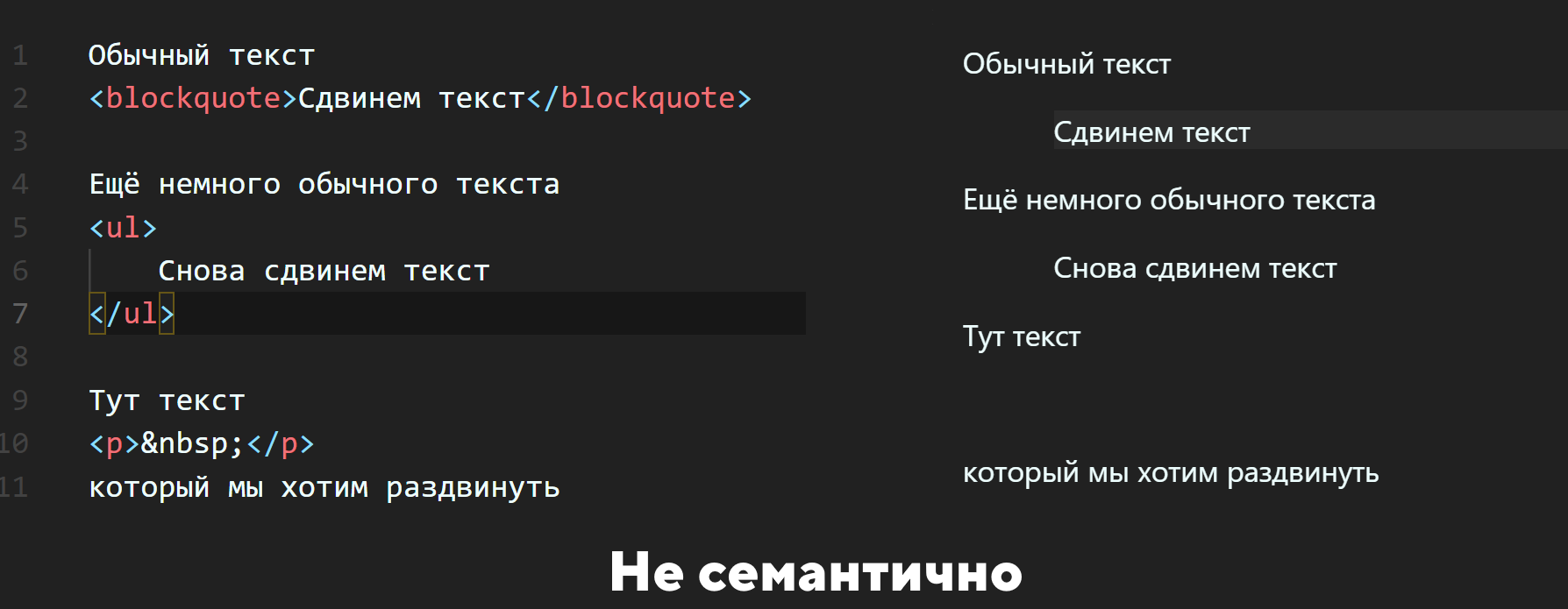
There are several mistakes here at once:
- Tag
<blockquote>should be used to highlight citations in text, not just random text selection. It just so happens that browsers have this block highlighted by default, but that doesn’t mean you have to use it that way. - Tag
<ul>is also used to visually “shift” the text. This is incorrect, because this tag should only be used to denote lists, and second, the tag<ul>only tags can be inserted<li>and nothing else. - Tag
<p>is used to visually expand the text. This tag is actually used to highlight paragraphs.
And any selection, shift or other transformation of text can be done with CSS.
So use semantic tags for their intended purpose.
Directly design a stylish appearance of the page will do in the second part of the article.